Issue Classification
Identify and categorize incoming customer issues.
Classify incoming issues, create the right tickets, draft customer acknowledgements, and keep cases moving through resolution.
Book a Demo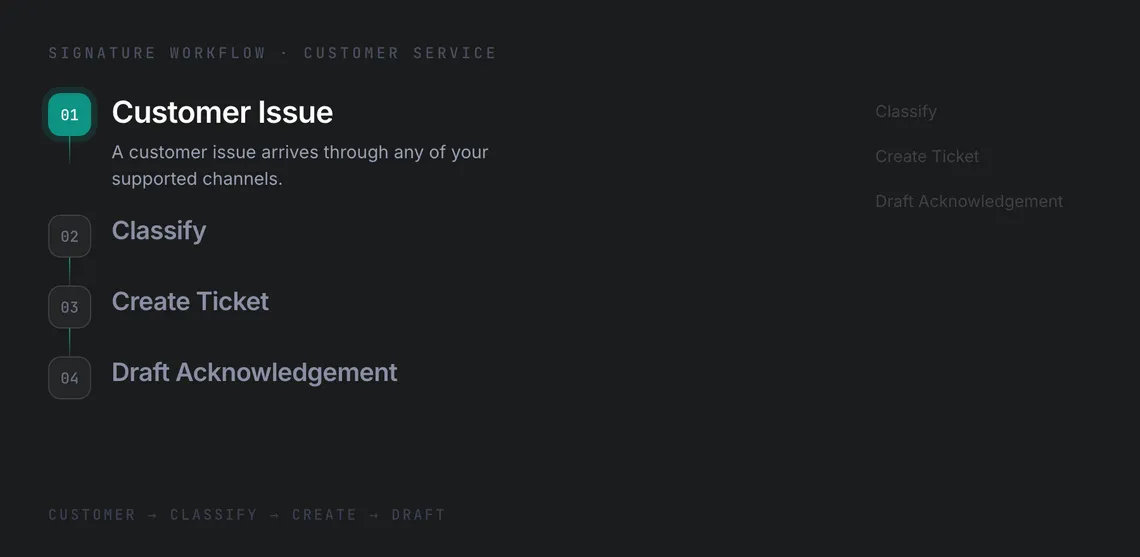
Reduce triage time without losing control.
Support teams are measured on response time and consistency, but manual triage consumes the time those targets depend on.
Identify and categorize incoming customer issues.
Create tickets, manage transitions, and post comments throughout resolution.
Retrieve prior correspondence and relevant documentation for each case.
See how CommandLyne automates the journey from an incoming issue to active resolution.
Input · Customer
An incoming customer issue enters the workflow together with the available customer and case context.
Intelligence · Triage
Identify and categorize the incoming issue so it can follow the appropriate support process.
Execution · Jira
Create the appropriate Jira case and move the issue into the team's resolution workflow.
Creation · Response
Generate a contextual acknowledgement that can be sent back to the customer.
Control · Human Review
Route customer-facing communication through the configured human-approval step before it is sent.
Outcome · Resolution
Keep the case moving through Jira and maintain visibility from the original issue through final resolution.
Enhance resolution speeds with multi-channel support, persistent memory, and strict operational controls.
01/04
Work across Slack, Discord, and Telegram using the same case context.
02/04
Retain context for recurring issues instead of starting from zero.
03/04
Choose which issue types can auto-respond and which require review.
04/04
Track classifications, tickets, drafts, and AI spend per case.
Reduce manual triage while keeping customer-facing work governed, reviewable, and traceable.
